Sunday, July 25, 2010

Tutorials-3-D Rings


3-D Rings

Tutorials-Radial Flowers


Radial Symmetry:

These were really fun and amazing. The idea is to create 1 flower petal and then
rotate copies of it around a center. I don't draw very well, so I picked out a few images from the
symbol palette that's part of the Illustrator program. I then elongated the symbols into a "petal" shape and copied/rotated them. The red flower was made from a ladybug, the blue/green from a fish, the gray/yellow from a scorpion and the yellow/orange from a bonfire. :) For the purple flower, I just made an oval, and then "pinched" it a bit.

Tutorials-Gears


Complex Paths

Tutorials-Snowman


Basic Shapes


Word Cloud


There's a site called Wordle.net where you can generate these cool word clouds by just typing words. Initially, the site creates a "cloud" for you, but once you move the file to Illustrator, you can rearrange things and add effects to suit yourself.

Fish and Frog


This assignment was to use only circles and ovals to create these images. Illustrator has a handy tool called "Pathfinder" which allows you to "cut out" sections of objects to change their shapes.

Day 1

It's the summer of 2010 and I'm taking an Adobe Illustrator class at Palomar College in San Marcos, CA. The fact that it's summer is significant. Summer classes teach you everything you would learn during a regular 16-week semester...BUT....summer classes only last 6 weeks. So here we go with high-speed learning :)

(The dates of these blogs DO NOT correspond to the dates when the works were completed. With the help of a very patient and experienced classmate, I finally learned how to add to this blog 1 month after I created it.) Thanks, Josh!

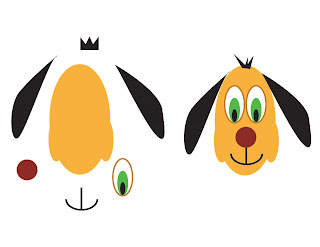
What you see below was our first assignment. The puppy pieces on the left needed to be manipulated and arranged to look like the puppy on the right. My rendition is the image with my name beneath it.